


Not sure if your Android phone supports eSIM? You’re not alone. As more Android devices switch to digital SIM technology, it’s getting easier to travel, switch plans, or manage multiple numbers all without the hassle of swapping tiny plastic cards.
This guide will help you check if your Android supports eSIM, understand why the option might not appear on your device, and show you a few quick troubleshooting steps. By the end, you’ll know exactly how to verify compatibility and how to get started with your first eSIM plan.
Understanding eSIM on Android Phones
How eSIM Works on Android Devices?
An eSIM (embedded SIM) is a small chip built directly into your smartphone. Instead of inserting a physical SIM card, you simply download a mobile plan digitally often by scanning a QR code.
Once activated, the eSIM connects your device to the mobile network just like a normal SIM, but it also allows you to switch carriers or add a second number instantly.
Why Some Androids Don’t Include eSIM Hardware?
Not every Android model includes eSIM capability. Here’s why:
• Hardware limitations: Only newer phones have the built-in eSIM chip.
• Region or firmware differences: Some models especially those made for the Chinese or U.S. markets may have eSIM disabled by software.
• Carrier policies: A few carriers restrict or block eSIM activation on specific devices.
If your phone doesn’t show the “Add eSIM” option, don’t worry. It may still support eSIM once updated or unlocked.
How to Check If Your Android Supports eSIM?
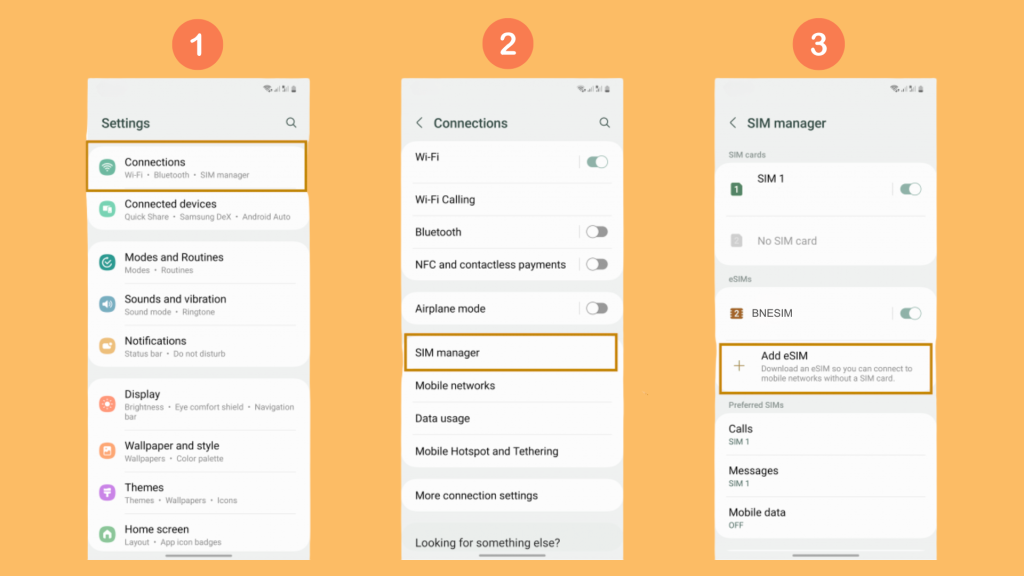
Check in Settings (fastest way)
- Open Settings on your Android.
- Tap Network & Internet → SIMs or Mobile Network.
- If you see an option like “Add eSIM”, your phone supports eSIM.
💡 Tip: On Samsung devices, look for Connections → SIM Manager → Add eSIM. On Google Pixel, it’s under Network & Internet → SIMs → + Add eSIM.
Check with your IMEI number
Every phone has a unique IMEI (International Mobile Equipment Identity) number that reveals its hardware capabilities.
- Dial
*#06#on your phone to see your IMEI numbers. - Look for a section labeled “EID” which indicates your phone supports eSIM.
- You can also check your IMEI on imei.info
Check carrier support pages
Even if your device supports eSIM, your carrier might not. Visit your provider’s website or BNESIM’s updated compatibility list.
If your phone model appears there, you can confidently install an eSIM plan right away.
Which Android Phones Support eSIM? (2025 List)
As of 2025, these Android brands and models commonly support eSIM:
• Google Pixel: Pixel 4 and later (Pixel 9 included).
• Samsung Galaxy: Galaxy S20 series and newer, Galaxy Z Flip/Fold series, Galaxy Note 20 Ultra.
• Motorola: Razr 2019 and newer.
• Oppo, Xiaomi, OnePlus: Select flagship and mid-range models (varies by region).
• Honor/Huawei: Limited support outside China.
👉 Check your exact model on BNESIM’s eSIM compatible list before buying an eSIM.
Why Your Android May Not Show eSIM? (Even if Compatible)
Carrier Blocked
Some carriers disable eSIM activation on their branded devices.
How to fix: Try inserting a SIM card, or request a carrier unlock.
Firmware or Region Limitations
Devices made for China or certain U.S. carriers might have firmware that hides the eSIM option.
How to fix: Flash your device with global firmware (advanced users) or check if a software update adds eSIM.
Outdated software
Older Android versions (below Android 10) may not display eSIM settings.
How to fix:Update to the latest Android version and restart your device.
FAQs
Does every Android support eSIM?
No. Only newer models (mostly 2019 and later) include eSIM hardware. Check your device in Settings or using your IMEI number.
Can I use two eSIMs at the same time on Android?
Some phones (like Pixel 7 and Samsung S24) support Dual eSIM, while others allow one eSIM plus one physical SIM.
How do I activate eSIM on my Android phone?
Go to Settings > SIM Manager > Add eSIM, scan the QR code or enter activation details from your provider.
How to switch between SIM and eSIM on Android?
Go to Settings → Network & Internet → SIMs, then select your preferred SIM for data or calls. You can toggle between them anytime.
Conclusion
If you’ve been asking “Does my Android phone support eSIM?”, now you know how to check quickly. Whether through your settings, IMEI number, or carrier support list, confirming compatibility only takes a few minutes.
For Android users who want to travel smarter, avoid roaming fees, and enjoy seamless connectivity, providers like BNESIM make it easy to get started with eSIM.

Kai Claide
A content creator with a love for the outdoors and pictures. A true beach person at heart, enjoys sunny coastlines, sipping matcha, and making the most out of every adventure. Curious and is always up for something fun.




 English
  Italiano