
Have you ever noticed the little airplane icon on your smartphone’s status bar and wondered what it really does? You’ve probably been told to “switch on airplane mode” before a flight, but what does airplane mode do, exactly? Beyond its obvious purpose of ensuring flight safety, airplane mode actually serves several practical functions that can help your phone’s performance, battery life, and even your focus.
In this blog, we’ll explore what airplane mode does, how it works, when and why you should use it, and how you can stay connected smartly with eSIM technology even when it’s turned on.
What Is Airplane Mode?

Airplane mode (also called flight mode) is a setting available on all smartphones, tablets, and even some laptops that disables your device’s wireless communication features. Once activated, it pauses cellular network signals, Wi-Fi, Bluetooth, and sometimes GPS, depending on the device.
The mode gets its name from its original purpose: complying with aviation safety regulations. During a flight, mobile networks can interfere with the aircraft’s communication and navigation systems. To prevent this, passengers are required to enable airplane mode, ensuring that their phones aren’t transmitting radio signals that could disrupt onboard equipment.
However, over time, airplane mode has evolved far beyond aviation. People now use it for various reasons like saving battery, improving charging speed, or cutting distractions.
What Happens When You Enable Airplane Mode?
Cellular and Mobile Data Turn Off
Your device disconnects from the nearest cell towers, meaning you can’t make or receive calls, send SMS messages, or use mobile data.
Wi-Fi and Bluetooth Disable Automatically
Initially, airplane mode turns off Wi-Fi and Bluetooth. However, modern devices (Android, iPhone, and tablets) allow you to manually turn these back on while airplane mode is active. This means you can still use wireless headphones or connect to in-flight Wi-Fi.
GPS May Be Limited
GPS doesn’t transmit signals. It only receives them. Some phones, however, restrict GPS-based services in airplane mode to save power.
Notifications and Calls Pause Temporarily
You won’t receive calls, texts, or app notifications that require an internet connection. But you can still use offline apps, listen to music, view downloaded maps, or read ebooks.
No Background Network Activity
Apps that rely on internet access like social media, emails, or maps stop refreshing automatically. This can reduce data usage and save battery life.
When and Why You Should Use Airplane Mode?
Although its name implies it’s only for flying, airplane mode has many practical uses in everyday life. Let’s explore when and why you should consider turning it on.
On Board Aircraft
This is, of course, the primary reason airplane mode exists. Airlines require passengers to disable cellular connectivity to prevent interference with flight instruments. Most modern aircraft now offer in-flight Wi-Fi, so passengers can still access the internet once the plane reaches cruising altitude. Just keep your device in airplane mode and re-enable Wi-Fi manually.
In Low or No Network Regions
When you’re in a place with weak or no signal like mountains, tunnels, or rural areas, your phone constantly searches for a cell tower to connect to. This constant scanning drains your battery fast.
Turning on airplane mode stops the search and conserves power.
When You Need to Charge Faster
Here’s a little-known trick: enabling airplane mode while charging your device can speed up the process. Because your phone stops syncing, refreshing apps, and using background data, the processor and network chips consume less power, allowing the battery to charge more efficiently.
To Disable Distractions Temporarily
Need focus time? Airplane mode blocks incoming calls, notifications, and social media alerts. It’s perfect for studying, meditating, or enjoying some screen-free downtime.
You can still enable Wi-Fi for music streaming or productivity apps while blocking unwanted interruptions.
Does Airplane Mode Save Battery?
Yes, airplane mode can significantly extend your phone’s battery life.
Here’s why:
• Your device’s cellular antenna is one of the biggest battery drains. When there’s no signal, it constantly tries to reconnect.
• Airplane mode disables that process entirely, cutting off energy use from mobile network searches.
• If you also turn off Wi-Fi and Bluetooth, you can extend standby time dramatically. Sometimes by up to 50% longer in poor coverage areas.
This trick is especially useful when traveling, hiking, or camping. Turn on airplane mode overnight, and you’ll wake up with nearly the same charge you had before.
Airplane Mode vs Do Not Disturb Mode
Many people confuse Airplane Mode and Do Not Disturb (DND) Mode, but they serve very different purposes.
| Feature | Airplane Mode | Do Not Disturb Mode |
|---|---|---|
| Cellular Calls | Disabled | Allowed but silenced |
| Text Messages | Disabled | Allowed but muted |
| Wi-Fi & Data | Turned off (can be re-enabled) | Remain active |
| Notifications | Stopped completely | Muted, still received |
| Battery Saving | Significant | Minimal |
| Ideal Use Case | Flights, no-signal areas, faster charging | Meetings, sleep, quiet focus time |
In short, airplane mode disconnects you from all networks, while DND mode simply silences notifications without cutting connectivity.
Airplane Mode and eSIM: Staying Connected Smartly
Airplane mode and eSIM work hand in hand, especially for frequent travelers.
When your phone is in airplane mode, your eSIM (a digital version of a SIM card built into your phone) also pauses its network connection. Once you land, simply turn off airplane mode, and your eSIM instantly reconnects to the local network.
This means:
• No swapping physical SIM cards in the airport.
• No waiting in line for local data plans.
• No roaming surprises on your next bill.
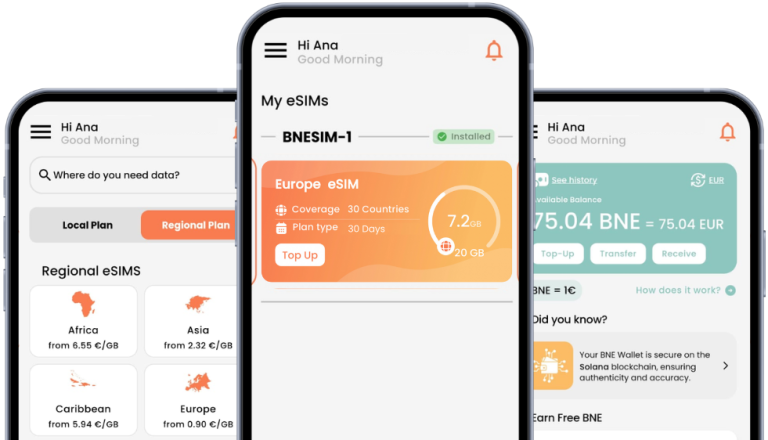
If you travel often, using a global eSIM like BNESIM’s worldwide plans can keep you connected seamlessly in over 200 countries. Just activate your eSIM before your trip, switch on airplane mode during your flight, and turn it off when you land. Your phone will automatically connect to the best local network.
FAQs
What happens if you don't turn on airplane mode?
If you ignore airplane mode instructions on a flight, your device may emit radio signals that can interfere with aircraft communication systems. Airlines enforce this rule strictly for safety reasons. In other situations, keeping your phone’s radios active can cause unnecessary battery drain and signal searching.
What happens when someone calls you on airplane mode?
When airplane mode is enabled, incoming calls go straight to voicemail or appear as “unreachable.” Your phone won’t ring, and you won’t receive call notifications until you turn airplane mode off and reconnect to a network.
Can I use Wi-Fi or Bluetooth in airplane mode?
Yes. While airplane mode initially disables both, most smartphones allow you to manually turn Wi-Fi and Bluetooth back on. This lets you connect to in-flight Wi-Fi or use wireless headphones during travel.
Will GPS still work in airplane mode?
GPS reception often continues to work since it’s a one-way system (receiving satellite data, not transmitting). However, some devices restrict GPS-based apps to save battery while in airplane mode.
Can I use eSIM with airplane mode?
You can’t use cellular data via eSIM while airplane mode is active, but you can still manage your eSIM settings or use Wi-Fi with it. Once airplane mode is off, your eSIM will reconnect automatically to your chosen carrier or local plan.
Conclusion
So, what does airplane mode do? It disconnects your device from all wireless signals, ensuring flight safety, saving battery, and helping you stay distraction-free. But it’s also a versatile feature you can use beyond travel—whether you’re trying to focus, charge faster, or preserve power in no-signal areas.
And with innovative connectivity tools like BNESIM eSIM, you no longer have to worry about staying offline when traveling. You can easily reconnect through Wi-Fi, manage your global data plans digitally, and enjoy seamless communication anywhere in the world—no physical SIM card required.
Airplane mode may temporarily disconnect you, but with smart tools like eSIMs, you’re never truly offline.

Kai Claide
A content creator with a love for the outdoors and pictures. A true beach person at heart, enjoys sunny coastlines, sipping matcha, and making the most out of every adventure. Curious and is always up for something fun.


 English
  Italiano