
There’s a particular kind of travel stress that hits when you land in a foreign country and realise your phone has no signal. No maps. No way to find your hotel. No way to message your travel companions. No access to your digital match ticket.
For a tournament as large and logistically complex as the FIFA World Cup 2026 — spanning three countries, 16 cities, and six weeks — staying connected isn’t a luxury. It’s a basic requirement for getting around, staying safe, and not missing the moments you’ve travelled thousands of kilometres to experience.
This guide explains everything you need to know about getting mobile data for your FIFA 2026 trip, in plain language. No technical jargon. No guesswork. Just clear, practical advice.
Why Connectivity Matters at FIFA 2026
Modern travel relies on a working phone in ways that weren’t true even a decade ago. For FIFA 2026 specifically, here’s what you’ll be using mobile data for on a daily basis:
• Accessing and displaying your digital match ticket at stadium gates
• Navigation between your accommodation, the stadium, fan zones, and restaurants in unfamiliar cities
• Real-time transport information — which train, which platform, how long the queue
• Staying in contact with your travel group (particularly important in large crowds)
• Looking up local information: restaurants, pharmacies, ATMs, emergency services
• Sharing photos and video in real time with people back home
• Using translation tools if you’re visiting Mexico
• Following match news, updates, and scores for games you’re not attending
None of this works without data. And unlike some trips where you can rely on hotel Wi-Fi for most of your needs, a World Cup trip involves long days outside, moving between venues, and spending hours in stadiums and fan zones where Wi-Fi is unreliable or non-existent.
Your Three Options for Getting Mobile Data
When traveling internationally, there are three main ways to get mobile data on your phone. Here’s how they compare for a FIFA 2026 trip:
International Roaming | Local SIM Card | |
Cost | High — often charged per MB or daily rate | Low — local rates |
Setup | Automatic but expensive | Buy on arrival per country |
Multi-country | Works everywhere, billed differently per country | Buy a new SIM each time you cross a border |
Convenience | Effortless — but you pay for it | Effort required at each country |
Best for | Short trips, expense account travel | Single-country stays |
International Roaming
Using your home carrier’s international roaming service is the path of least resistance — your phone just works when you land. The problem is cost. Roaming charges vary significantly by carrier and country, but they are almost always the most expensive option, particularly over a multi-week trip across three countries. A few weeks of heavy data use through a standard roaming plan can easily result in a very unpleasant bill.
Some carriers offer flat daily roaming rates (typically £5–15 / $5–25 per day), which are more manageable for short trips but still add up over several weeks. Check your carrier’s rates carefully before relying on this option.
Local SIM Cards
Buying a local prepaid SIM card on arrival is a tried-and-tested way to get affordable data abroad. The data rates are good, and local SIMs are widely available at airports, convenience stores, and phone shops in the USA, Canada, and Mexico.
The catch for FIFA 2026 travelers is the multi-country element. If your itinerary takes you across more than one host nation, you’d need to buy a new SIM card each time you cross a border — and deal with finding a shop, choosing the right plan, and switching physical SIM cards every few days. For a multi-city trip, this gets old quickly.
eSIM
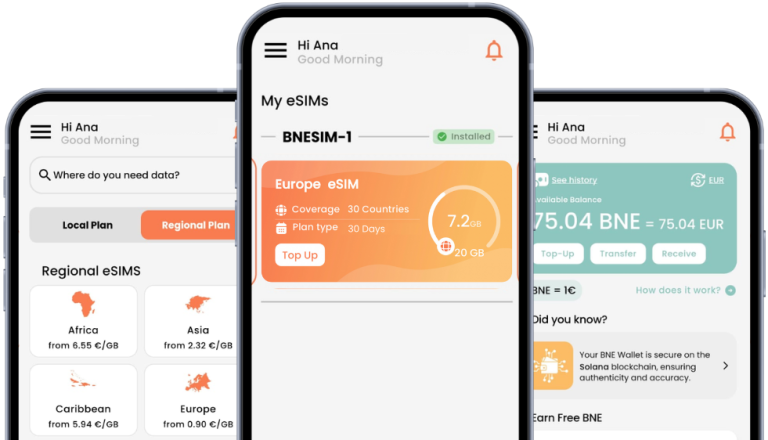
An eSIM is a digital SIM built into your phone. Instead of inserting a physical SIM card, you download a data plan directly to your device — usually via a QR code or an app. BNESIM offers exactly this, with a North America Regional plan built specifically for FIFA 2026 travelers. The key advantages are significant:
eSIM | Traditional SIM |
Activate before you leave home | Buy on arrival, queue at the shop |
Works across USA, Canada & Mexico on one plan | One SIM per country |
No roaming charges | Roaming fees may apply |
No physical swap needed | Must physically change SIM each time |
Keep your regular number for calls | Lose your regular number while abroad |
The most important advantage for this particular tournament is multi-country coverage. BNESIM’s North America Regional plan covers all three FIFA 2026 host countries — the USA, Canada, and Mexico — under a single plan. You move between countries and your data just works, with no new SIM, no new plan, and no roaming charges.
Is Your Phone eSIM Compatible?
By 2026, the vast majority of modern smartphones support eSIM technology — but older or budget devices may not. Here’s a quick guide to the most common models:
• iPhone XS and later: eSIM supported
• Google Pixel 3 and later: eSIM supported
• Samsung Galaxy S20 and later (most models): eSIM supported
• Many other Android flagships from 2020 onward: check your manufacturer’s specifications
Your phone also needs to be unlocked (not locked to your home carrier) to use a third-party eSIM like BNESIM. If you’re unsure, contact your carrier before your trip. Unlocking is usually free and straightforward for phones that are fully paid off.
Check your exact model on BNESIM’s eSIM compatible list before buying an eSIM.
How Much Data Do You Actually Need?
This is the question most travelers underestimate. Here’s a rough daily data consumption guide for a typical FIFA 2026 trip day:
• Navigation (Google Maps, Apple Maps): 50–100 MB per day
• Messaging apps (WhatsApp, iMessage): 50–200 MB per day depending on media sharing
• Social media browsing and posting: 200–500 MB per day
• Uploading photos and short videos: 500 MB–1 GB per day
• Streaming match highlights or audio: 500 MB–1 GB per hour
• General browsing and search: 100–200 MB per day
For a typical active travel day — navigating the city, messaging your group, sharing some photos, doing a bit of browsing — you can expect to use around 1–2 GB of data. Over a two-week trip, that’s 15–30 GB. If you plan to upload video or use your phone as a hotspot for a tablet or laptop, budget more.
When choosing a data plan, opt for more than you think you’ll need. Running out of data while navigating an unfamiliar city on match day is not a situation you want to be in.
Setting Up Your eSIM: Step by Step
Getting set up with the BNESIM travel eSIM is simpler than it sounds. Here’s the process:
- Check compatibility: Confirm your phone supports eSIM and is unlocked.
- Choose your plan: Select a plan that covers all the host countries on your itinerary, with enough data for the duration of your trip.
- Purchase and download: Complete your purchase online and receive a QR code or app-based activation link.
- Activate before you fly: Install the eSIM on your device at home while connected to Wi-Fi. Do not wait until after you land.
- Set as data plan: In your phone’s settings, set the eSIM as your active data line. You can keep your home SIM for calls and texts.
Test it: Browse a website or load a map before you leave home to confirm it’s working. Don’t discover a problem at the airport.
Tips for Staying Connected at Stadiums and Fan Zones
Stadiums and large fan gatherings create extreme demand on local mobile networks. Even with a good data plan, you may find speeds are slower than usual when 60,000 people are all trying to use their phones at the same time. A few tips:
• Download offline maps for each host city before match day — they’ll work even without a signal
• Save your match ticket to your phone’s native wallet app (Apple Wallet, Google Wallet), not just a PDF or screenshot — wallet passes display without a network connection
• Agree a meeting point with your group before you enter the stadium, in case you lose signal inside
• Use WhatsApp or iMessage rather than SMS — they use data rather than your cellular signal and work better in crowded environments
• Turn off auto-playing video in social media apps to preserve data in slower-network conditions.
The Straightforward Answer
For tourists asking what’s the easiest way to get internet in North America for FIFA 2026, the answer is clear: the BNESIM’s North America Regional plan. Whether you’re attending matches in one city or following your team across all three host countries, it’s the most practical and cost-effective solution available.
It handles everything: no roaming charges, no SIM card shopping on arrival, no starting again every time you cross a border. You activate it before you leave home, and from that point forward your data just works — in Dallas, in Vancouver, in Guadalajara, or wherever the tournament takes you next.
There’s one option that ticks every box for FIFA 2026 travelers. Activate it before you fly, and the only thing you need to think about is the football.


 English
  Italiano